- AI Search Guide
- ChatGPT
- Business Hub
Get Your Store On ChatGPT For Free With Business Hub
ChatGPT is now a place where shoppers ask for recommendations. Getting your business in front of them takes three things: claiming your business, understanding what ads can and can't do, and giving ChatGPT good reasons to recommend you over your competitors. Here's how to do each one, and which IndexGPT tools help along the way.

Step 1: Claim your business on ChatGPT Business Hub
ChatGPT launched Business Hub on November 10th. It lets you claim your business, update its information, connect your product feed and see how people discover you.
- 1. Go
Open Business Hub
Go to chatgpt.com/business-hub.
- 2. Claim
Claim your business
Find your business and claim it as yours.
- 3. Verify
Complete verification
Including identity verification when requested. On Shopify, connecting your store simplifies this.
| In Business Hub you can | Why it matters |
|---|---|
| Claim your business | ChatGPT knows the business is officially yours |
| Update your information | Your details stay accurate when ChatGPT talks about you |
| Connect your product feed | Your products, prices and availability come straight from you |
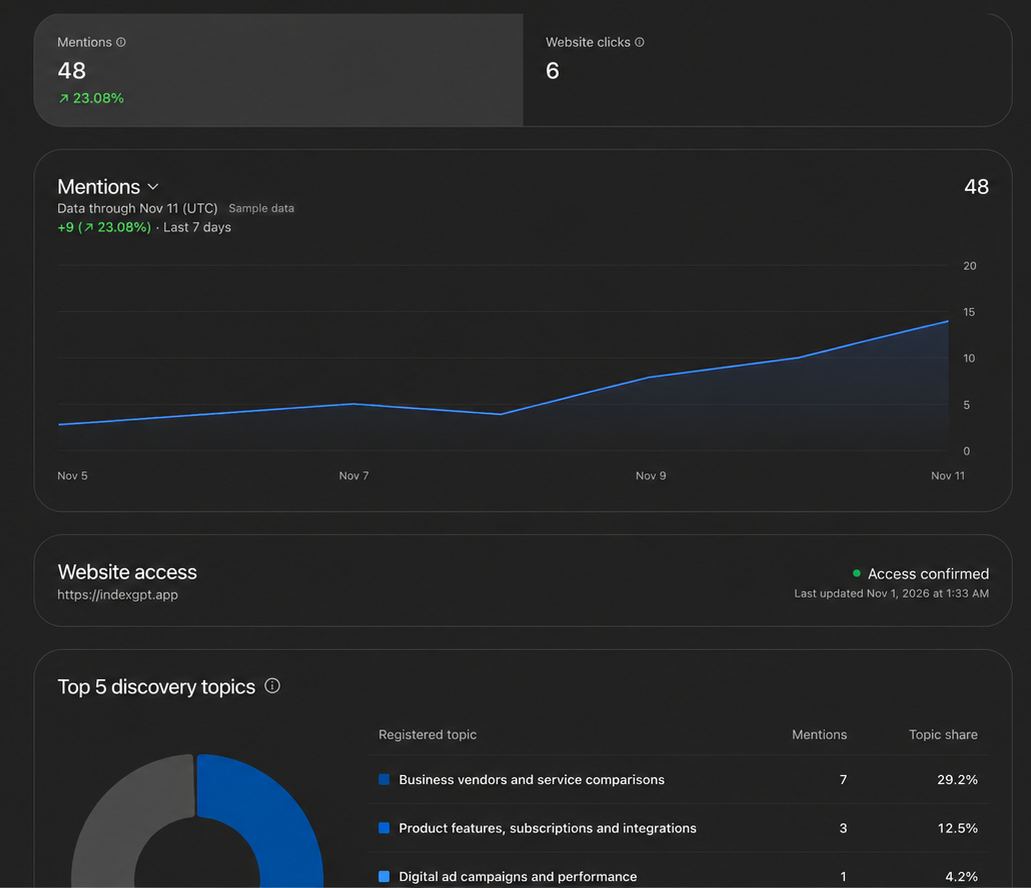
| See how people discover you | Mentions, website clicks and common conversation topics |
The insights are aggregated, and they appear once there is enough activity to report. A new business may see an empty dashboard at first.
Step 2: Know what ads can and can't do
ChatGPT Ads has campaign and bidding tools, including automatic bid adjustments based on your budget and goals. They are useful, with one important caveat: ads are paid placements, separate from ChatGPT's answers. Advertising doesn't buy you organic recommendations.
An ad placement
- You set a budget and goals
- Bids adjust automatically
- Your ad shows next to answers, to eligible users
Stops when the budget stops. Doesn't change what ChatGPT recommends.
A recommendation in the answer
- A shopper asks a question
- ChatGPT searches and reads trusted pages
- It recommends the businesses those pages support
Earned with useful content and a strong presence online. Keeps working, for every user.
Who sees ChatGPT ads
| ChatGPT plan | Sees ads? |
|---|---|
| Free | Yes, if eligible |
| Go | Yes, if eligible |
| Plus, Pro, Business, Enterprise, Edu | No |
Take that into account when deciding whether to advertise. If your customers are mostly on paid plans, ads won't reach them, and organic recommendations become even more important.
Also good to know: eligible ecommerce and online service businesses in the US can create a Business Agent that answers customer questions using their own business information.
Step 3: Beat the competition in the answers
Claiming your business gets you on the map. Being recommended is a different challenge, and the good news is that most rules from traditional search still apply.
When ChatGPT searches the web, it retrieves information from online sources to help build its answer. This is a form of RAG (retrieval-augmented generation): using retrieved information alongside what the model learned during training. So your authority, technical SEO and content relevance still matter. Your website needs to be:
- Discoverable: search and AI crawlers can reach and read your pages.
- Easy to understand: clear structure and data that says what you sell and to whom.
- Useful: answers real customer questions better than the alternatives.
- Trusted: mentioned by forums, review sites and articles ChatGPT relies on.
Questions get very specific
The extra challenge in AI search is how specific the questions can get. Shoppers don't type keywords to ChatGPT. They describe their situation.
The same search, as a shopper keeps adding details
A generic product description gives ChatGPT very little to work with. Clear information about fit, use cases, limitations and comparisons makes it easier to assess whether your product actually matches.
| What ChatGPT needs | Generic description | Helpful description |
|---|---|---|
| Who it's for | "For all runners" | "Built for beginners running 5 to 10 km" |
| Fit | "Comfortable fit" | "Wide toe box, available in wide (2E) sizes" |
| Use case | "Great for running" | "Grippy outsole for wet roads and city runs" |
| Limitations | Not mentioned | "Not designed for trail running" |
| Price and availability | Outdated or missing | "€129, in stock, free returns within 30 days" |
| Comparisons | Not mentioned | "Lighter than our Model X, with more cushioning" |
Write for your customers' questions
- Start with your customers' questions, not your product catalog.
- Explain who each product is for, what it solves and where it falls short. Honesty about limitations builds trust, with shoppers and with ChatGPT.
- Keep prices, availability and policies current.
- Make sure search crawlers can access those pages.
How IndexGPT helps at every stage
If you use Shopify, IndexGPT covers the work above inside your Shopify admin. Every tool lives on the Tools page in the IndexGPT menu, and your Action Plan (also in the menu) gives you a to-do list tailored specifically to your store, based on your AI SEO score.
Be discoverable
Make sure search engines and AI crawlers find your pages, and find out fast when they change.
- Instant IndexingEssentialsTells search engines (Bing and ChatGPT) the moment your store updates.
- Robots.txt AnalysisEssentialsChecks that AI crawlers like GPTBot and ClaudeBot can access your content.
- LLMs.txtEssentialsTells ChatGPT, Claude and other AI agents what's in your store.
Be easy to understand
Describe your store and products in a way machines read without guessing.
- Schema MarkupPremiumAdds structured data so Google and AI crawlers understand your store.
- Brand SignalsEssentialsRegularly communicates your brand to ChatGPT, Gemini, Claude and other AI platforms.
- Brand SettingsDescribe your store, ideal customer and what makes you different. The content tools use it.
Be useful
Publish the content that answers your customers' questions.
- Content MasterPremiumGenerates FAQs, About Us pages, product reviews and brand comparisons for your store.
- Smart BloggerPremiumWrites blog posts tailored to your store and niche.
Measure and improve
See whether AI assistants mention you, and where they look.
- Prompt TrackingPremiumTests whether ChatGPT, Gemini and Claude mention your store for your customers' questions.
- Query Fan-outPremiumShows the exact searches ChatGPT runs and the pages it reads, with an action plan.
- LLM SentimentPremiumShows how ChatGPT, Gemini and Claude currently talk about your brand.
- MonitorYour AI traffic from Google Analytics and your LLM mentions, in the menu.
Where to find them: Tools in the IndexGPT menu, under Set & forget, Reports & analysis and Content tools. Monitor, Action Plan and Brand Settings have their own place in the menu.
Step 4: Test the questions your customers ask
The last step is to check how ChatGPT actually answers. Test a small set of questions your customers would realistically ask. Check which businesses appear, which sources get cited and what information your website is missing.
One answer is a snapshot. ChatGPT may already tailor it to you, so repeat your tests over time and with different accounts.
| What you want to know | Do it by hand | With IndexGPT |
|---|---|---|
| Does ChatGPT mention my store? | Ask ChatGPT from a few accounts | Prompt Tracking tests your questions across ChatGPT, Gemini and Claude |
| Which sources does it use? | Check the citations in each answer | Query Fan-out lists every search and every page it found |
| Who shows up instead of me? | Note the brands in each answer | Query Fan-out counts how many pages name each competitor |
| How does it talk about my brand? | Ask about your brand directly | LLM Sentiment scores how AI assistants perceive you |
| What should I fix first? | Compare your pages with the cited ones | The Action Plan in Query Fan-out and in the menu |
A simple routine
| When | What to do | Where |
|---|---|---|
| Week 1 | Claim your business and complete verification | chatgpt.com/business-hub |
| Week 1 | Turn on Instant Indexing and LLMs.txt, run the Robots.txt check | IndexGPT › Tools › Set & forget |
| Week 2 | Fill in Brand Settings and add Schema Markup | IndexGPT › Brand Settings, Tools |
| Week 2 | Run Query Fan-out on your 5 most important customer questions | IndexGPT › Tools › Reports & analysis |
| Weeks 3 and 4 | Work through the action plans: replies, outreach, new pages | Query Fan-out, Action Plan, Content tools |
| Every month | Re-run your questions and check your AI traffic | Prompt Tracking, Monitor |
Claim your business, then give ChatGPT reasons to recommend it
Start by claiming your business on Business Hub. Then focus on being discoverable, easy to understand and genuinely useful. If you sell on Shopify, IndexGPT gives you the tools for each step, and an action plan tailored to your store.